Project controls · Maintenance & turnaround planning · Manpower · Academy — USA · Canada · Worldwide

Schedules that win the bid and finish the job on time.

Proposal, fabrication, EPC and outage schedules in Primavera P6 and MS Project, built with our Baseline Lock method (build → link → PO ETA → freeze) and reported with the manpower plans, S-curves and SPI / CPI that keep a project honest. For operating plants: maintenance work planning, turnaround planning, work packages and drawing markups. Backed by an AI scheduling assistant on live P6 data and an academy that makes planners job-ready — and certified.

On the free session you get: a planner (not a salesperson) reviews your bid, schedule or outage plan, shows you where the float is hiding and what is actually driving the finish date, and sends you a written 3-point action plan — yours to keep whether or not you hire us.
Primavera P6 · MS Project Level 2 · 3 · 5 schedules S-curves · EVM · SPI / CPI Day & night shift manpower plans Excel · Power BI · SQL reporting Maintenance & turnaround planning PMP · PMI-SP · RMP · CMRP · CRE · P.Eng prep
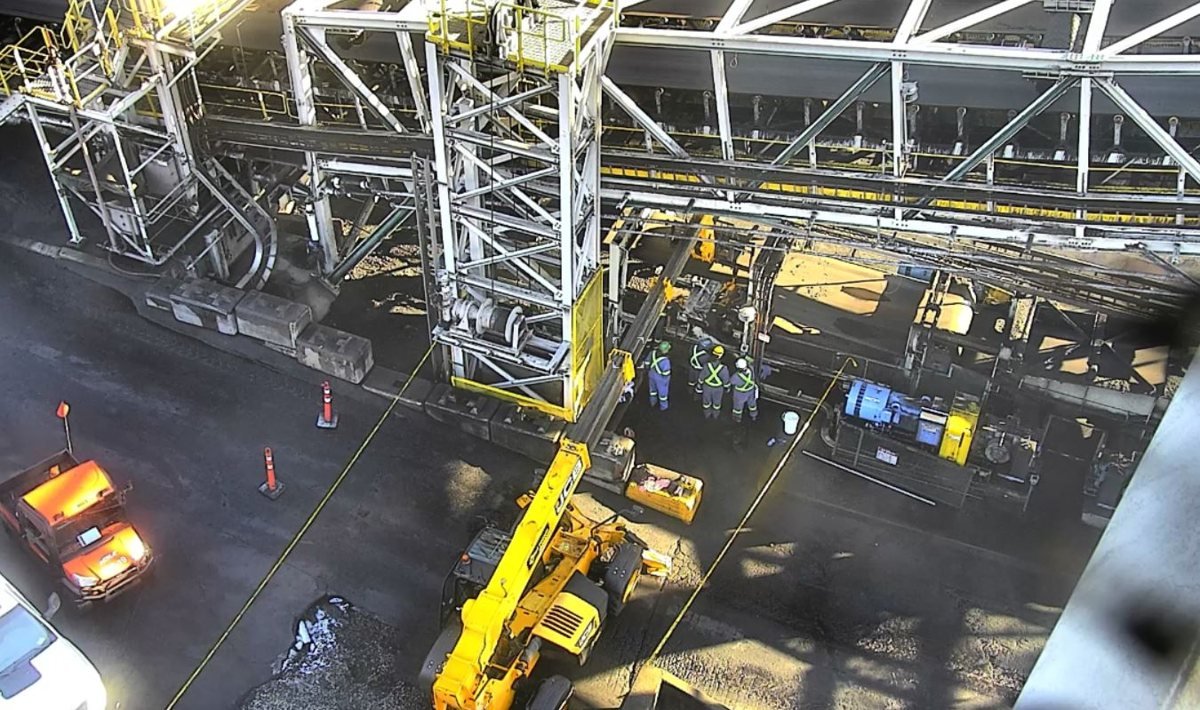
Background: maintenance and shutdown work we planned and scheduled — identifiers removed.
One tap — tell us what you need

Pick one and the brief form fills itself in. Send it, or push the same text to WhatsApp.

Project management & project controls services

One team for the whole schedule lifecycle — from the proposal to the last shift.

We build the schedule, load it with manpower, baseline it, and report it with S-curves and earned value — in the format your client, lender or owner's engineer expects.

Level 2

Proposal & bid schedules

Win-ready schedules for RFPs and tenders: key milestones, EPC or fabrication phases, a manpower histogram with peaks and valleys, and a basis-of-schedule narrative — formatted to the bid's requirements and built to the bid deadline — for customers, clients and your internal project-management team.

  • Milestone & phase logic that survives client review
  • Resource histogram + man-hour summary
  • Narrative and assumptions page
Level 3 baseline

EPC schedules — engineering, procurement & construction

Execution baselines that tie engineering deliverables, purchase orders and vendor lead times (PO → ETA) to construction — with rules of credit, Physical % Complete and a frozen baseline you can be measured against.

  • Build → link → PO ETA → freeze (B1 / B2)
  • Rules-of-credit weightings per discipline
  • Progress measurement set up for EVM
Shop floor

Fabrication schedules

Work-package schedules for fabricators and shops: cut, fit, weld, NDT, paint, ship — loaded with man-hours per trade so you can see the crew you need each week and promise delivery dates you can keep.

  • Work-package & spool / assembly level
  • Trade man-hour loading & look-aheads
  • Delivery-date commitments backed by logic
Level 5 · shift-level

Outage, shutdown & turnaround packages

Hour-by-hour outage schedules for heavy equipment and plant shutdowns, with day-shift and night-shift manpower plans, daily progress reports and revision control — the full package, as delivered on real mining-equipment outages.

  • Shift-level Gantt + Excel version for the client
  • Day / night crew histograms with peak curve
  • Daily progress report templates (day & night)
Reporting

Progress reporting, S-curves & earned value

Weekly and monthly reporting that owners trust: planned vs earned vs actual S-curves, SPI and CPI, variance explanations, 4-week look-aheads and a clean PDF report pack — reported on Performance % Complete, never Schedule %.

  • Auto-generated Excel S-curves from P6 or MS Project
  • SPI / CPI / EAC with plain-English narrative
  • Power BI dashboards when you want them live
Recovery

Schedule health, recovery & delay analysis

When a schedule is slipping, we find out why — logic checks, float erosion, critical-path and what-if analysis — and build the recovery schedule or time-impact analysis you need for the conversation with the client.

  • Schedule health & logic audit
  • What-if, impact & recovery scenarios
  • Claims-ready time-impact analysis
On site · boots on the ground

Primavera P6 implementation at your site

We stand up P6 for your company or project and make it usable: EPS / OBS, calendars, activity and resource codes, WBS and schedule templates, layouts, filters and reports, global data standards — then we train your planners on it, at your office or project.

  • Enterprise setup & standards (EPS, OBS, codes, calendars)
  • Templates, layouts & report pack your client accepts
  • Hands-on training for your team at your site
Request P6 implementation
Ongoing

P6 management & scheduling support

We run your P6 environment and your schedules month after month: progress updates, baselines and re-baselines, user and project admin, data checks, look-aheads and the report pack — a scheduling desk your project managers can call, without adding headcount.

  • Weekly / monthly update cycles with QA checks
  • Baseline control (B1 / B2) & change log
  • Admin, users, templates & report pack
Request P6 management
Reporting system

Project controls & dashboard setup

We design the project-controls system behind the schedule: progress measurement and rules of credit, cost / schedule integration, manpower tracking, and Power BI or Excel dashboards that refresh from P6, MS Project and your cost and timesheet data — one page your management actually reads.

  • Progress measurement & EVM setup
  • Power BI / Excel dashboards connected to P6 and cost data
  • Procedures, templates & handover training
Request dashboard setup
Operating plants · outages

Work package build-up

Execution-ready work packages for maintenance, outage and turnaround scope: job steps, crafts and hours, isolations and permits, lifts and scaffolding, materials and special tools, inspection points and close-out — built from your worklist and drawings so the crew can execute without calling the planner.

  • Job plans, task lists & estimates per work order
  • Permit, isolation & lift planning folded in
  • Contractor packages ready to price and execute
Request work packages
Engineering

Engineering drawing markups & redlines

P&IDs, isometrics, GAs and single-lines marked up for scope definition, isolation and blind lists, construction sequencing and as-built redlines — clean, legible markups your engineers, inspectors and contractors can work from, delivered as PDF with a markup register.

  • Scope, isolation & blind-list markups
  • Sequencing and work-package references on the drawing
  • As-built redlines with a change register
Request drawing markups
Maintenance · reliability

Maintenance planning & scheduling setup

We stand up (or fix) the work-management system in your plant: backlog clean-up, job plan library, PM optimisation, the weekly scheduling process and meeting, and the planner KPIs — schedule compliance, PM compliance, backlog weeks, wrench time — in Excel or Power BI on your CMMS data.

  • Backlog health & job plan library
  • Weekly scheduling process your supervisors will follow
  • Planner KPI dashboard on SAP PM / Maximo data
Request a planning setup
01

Brief

Send the scope, drawings or RFP and your deadline. We reply on WhatsApp with what we need and when you'll have it.

02

Build

WBS, activities, logic, durations, calendars and resources in P6 or MS Project — reviewed with you before it goes anywhere.

03

Baseline

Link procurement ETAs, set rules of credit and EV settings, then freeze the baseline you will be measured against.

04

Report

Weekly updates, S-curves, SPI / CPI, look-aheads and the PDF pack — or we train your team to run it themselves.


Why our schedules hold up — the Baseline Lock method

Most schedules fail in the first month because they were never locked. Ours are built to be measured against.

A schedule that was never properly linked, never tied to real procurement dates and never frozen cannot tell you the truth about a slip — so the first progress update turns into an argument. The Baseline Lock is the sequence we run on every project so the baseline survives contact with reality.

  1. 1Build — WBS, activities, durations and calendars from the real scope, not a template.
  2. 2Link — every activity has a predecessor and a successor; logic is audited, open ends closed, constraints removed.
  3. 3PO ETA — procurement and vendor lead times are tied to purchase orders and confirmed ETAs, so engineering, deliveries and construction move together.
  4. 4Freeze — rules of credit and earned-value settings are set, then the baseline is frozen (B1; re-baselines as B2) and reported on Performance % Complete from day one.
Inside a real outage schedule package

What a client receives from us — a 16-day heavy-equipment outage, day and night shifts.

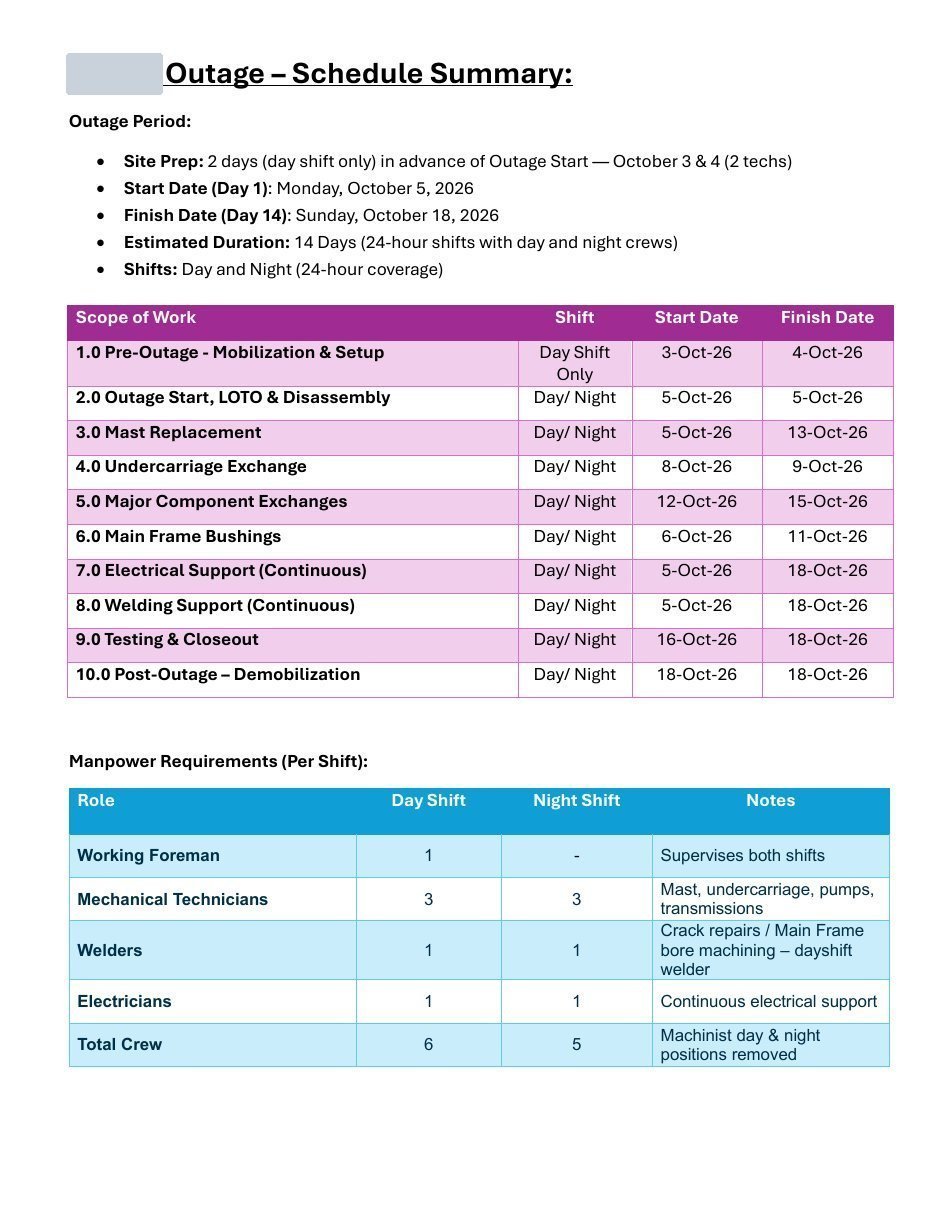
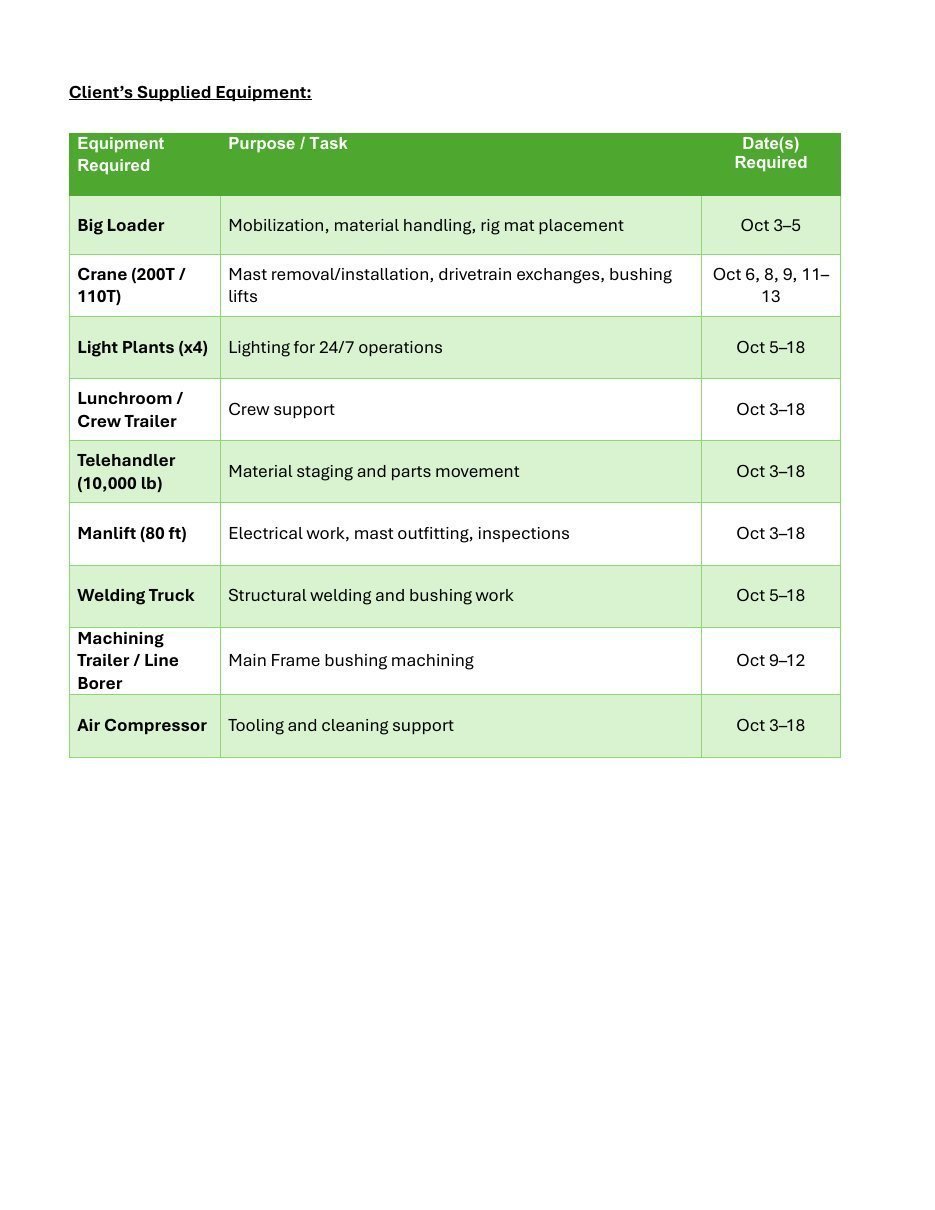
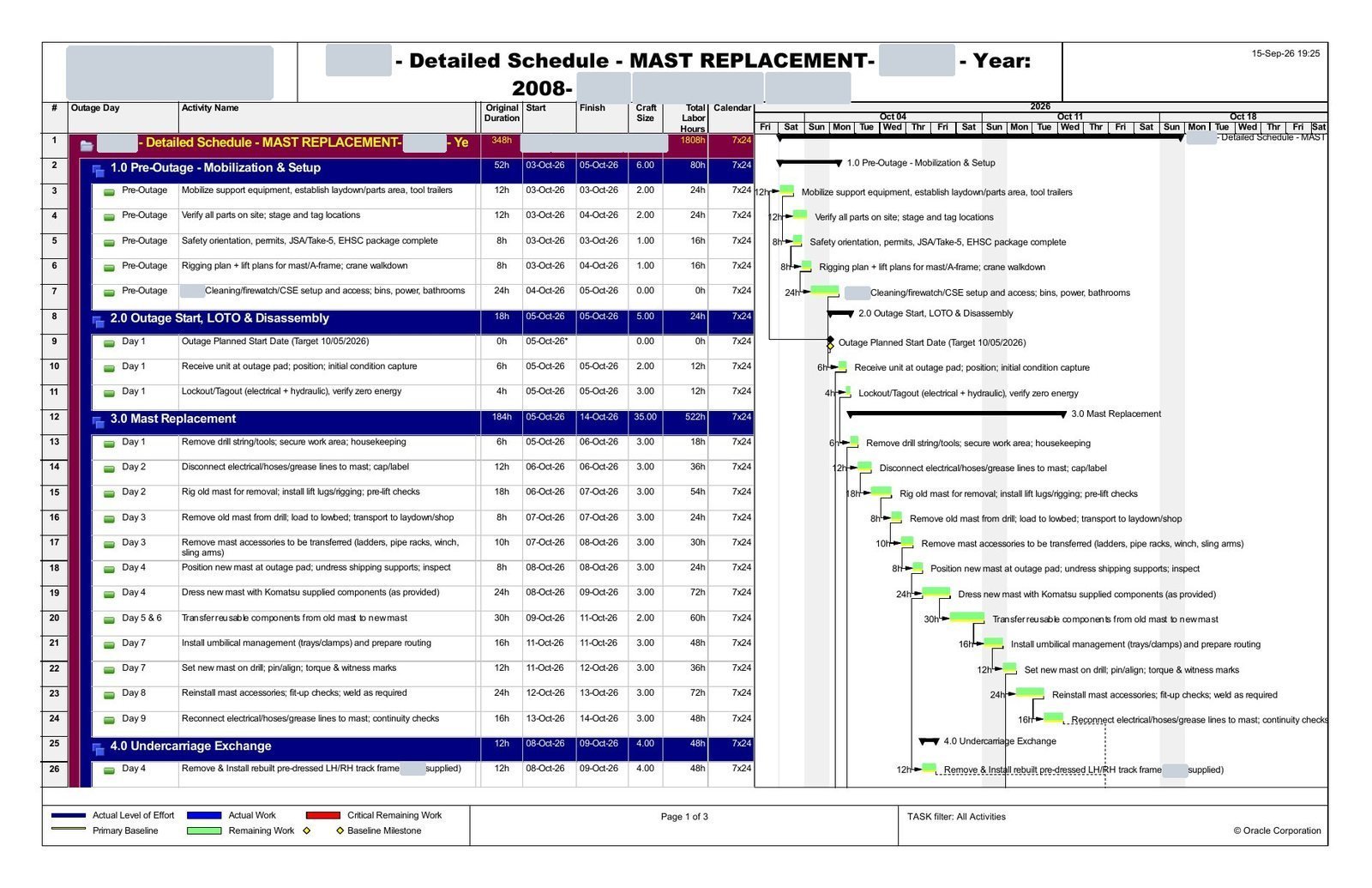
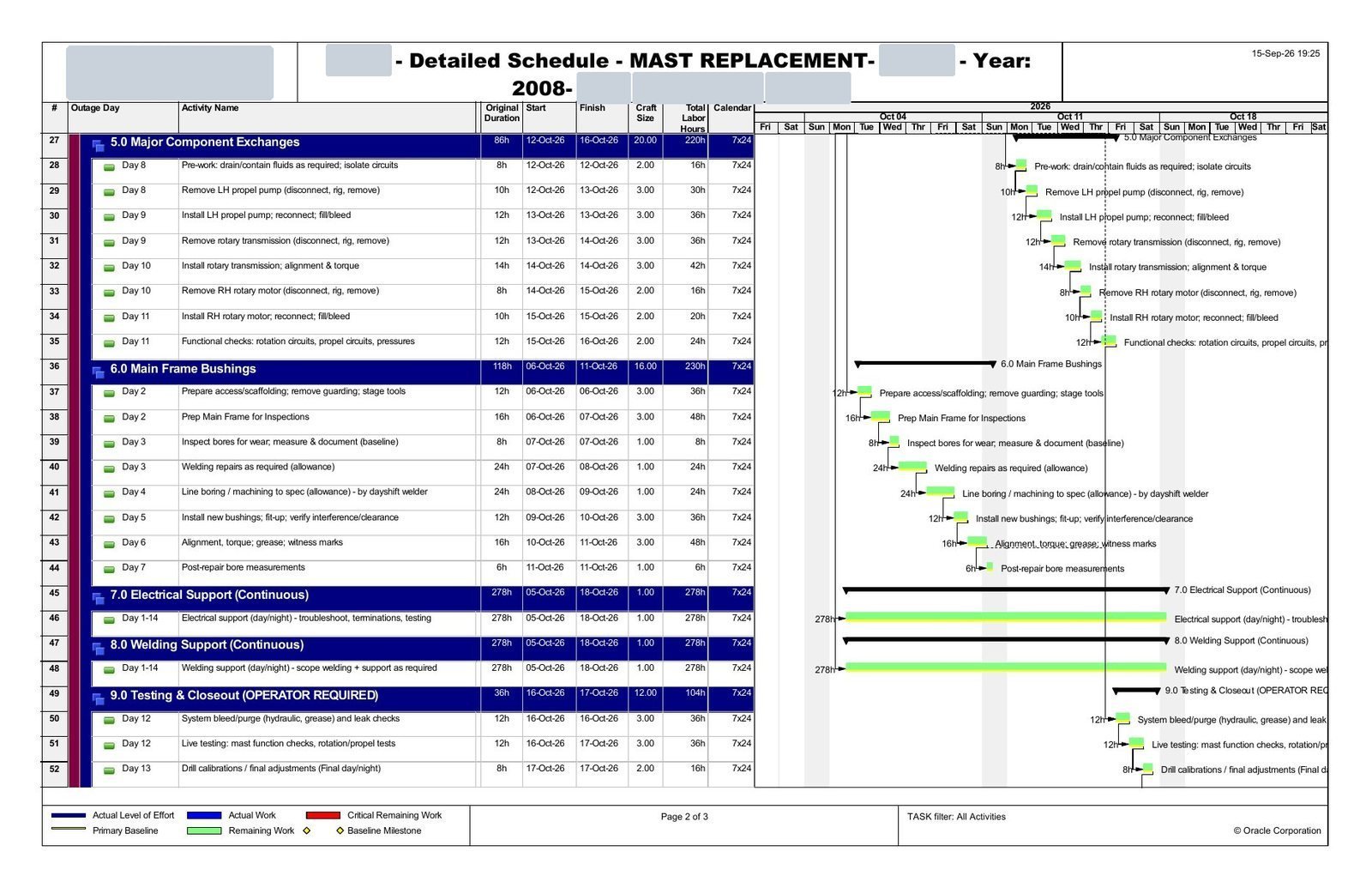
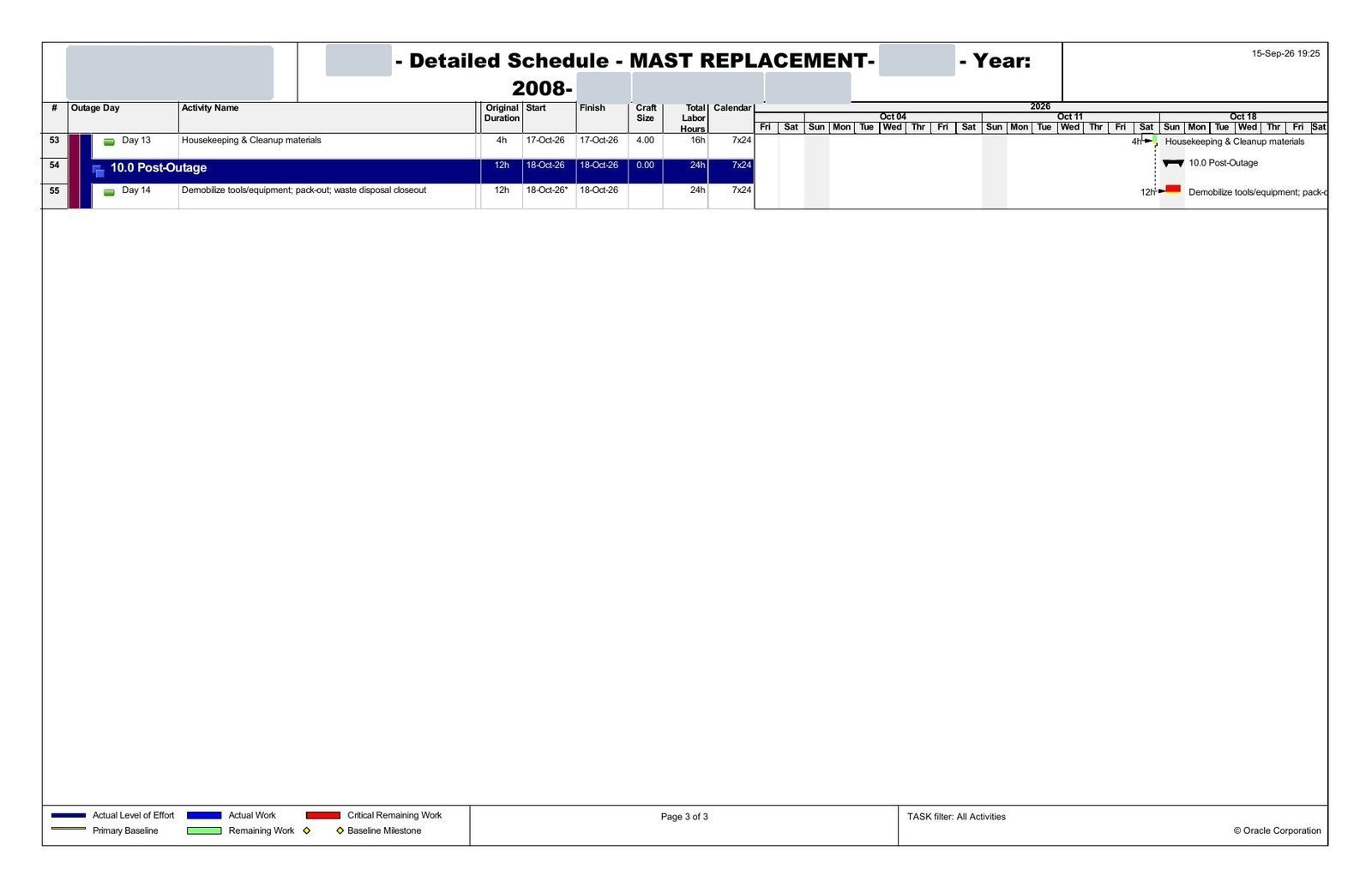
Below is the structure of a package we delivered for a 3–18 October 2026 outage on a piece of heavy mining equipment. Client, site and personal identifiers have been removed; the crew numbers and dates are the real ones.

  • 1
    Outage schedule — shift-level Gantt (PDF)Every activity by day and night shift, with predecessors, float and milestones. Issued as Rev 0 → Rev 1 with a change log.
  • 2
    Excel Gantt for the client's teamThe same schedule in a spreadsheet so supervisors can mark progress on site without P6.
  • 3
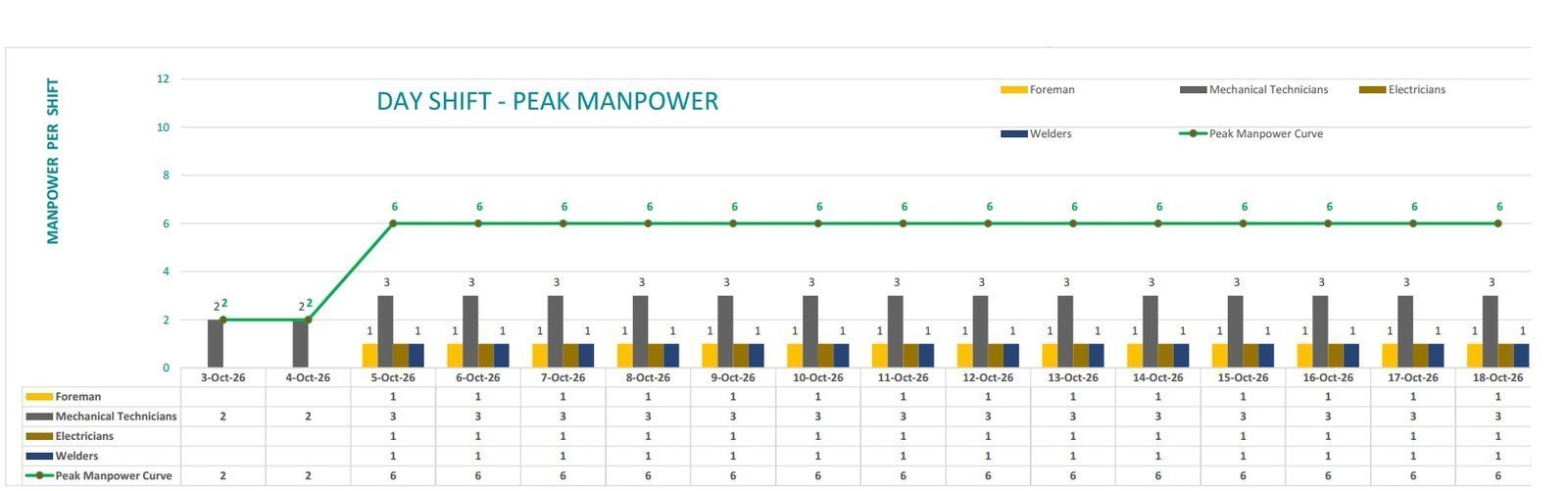
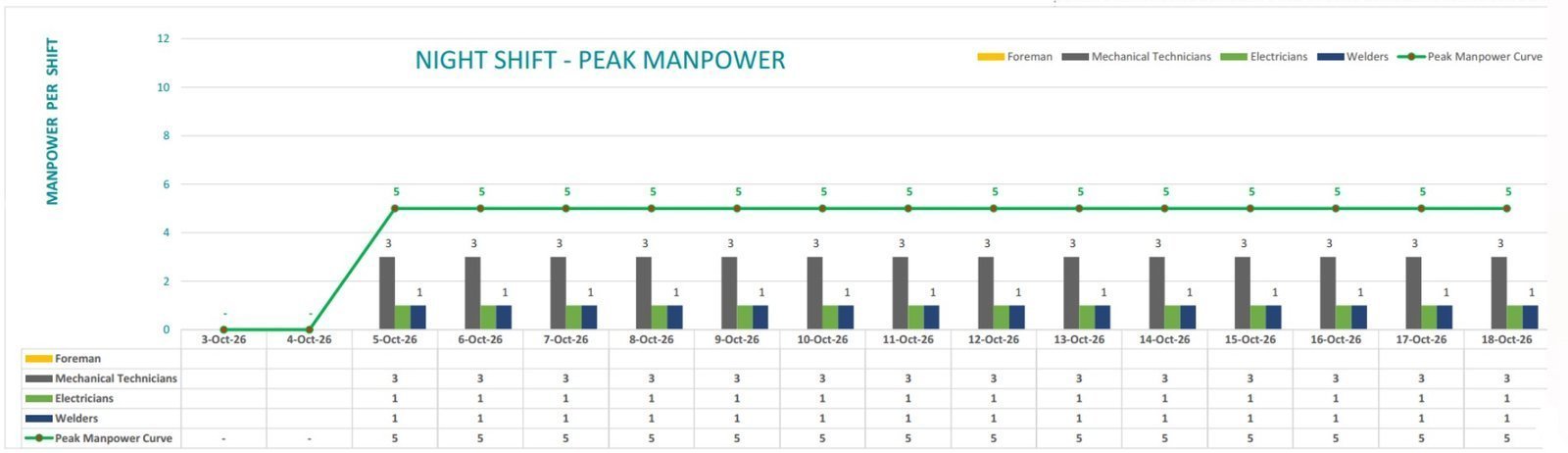
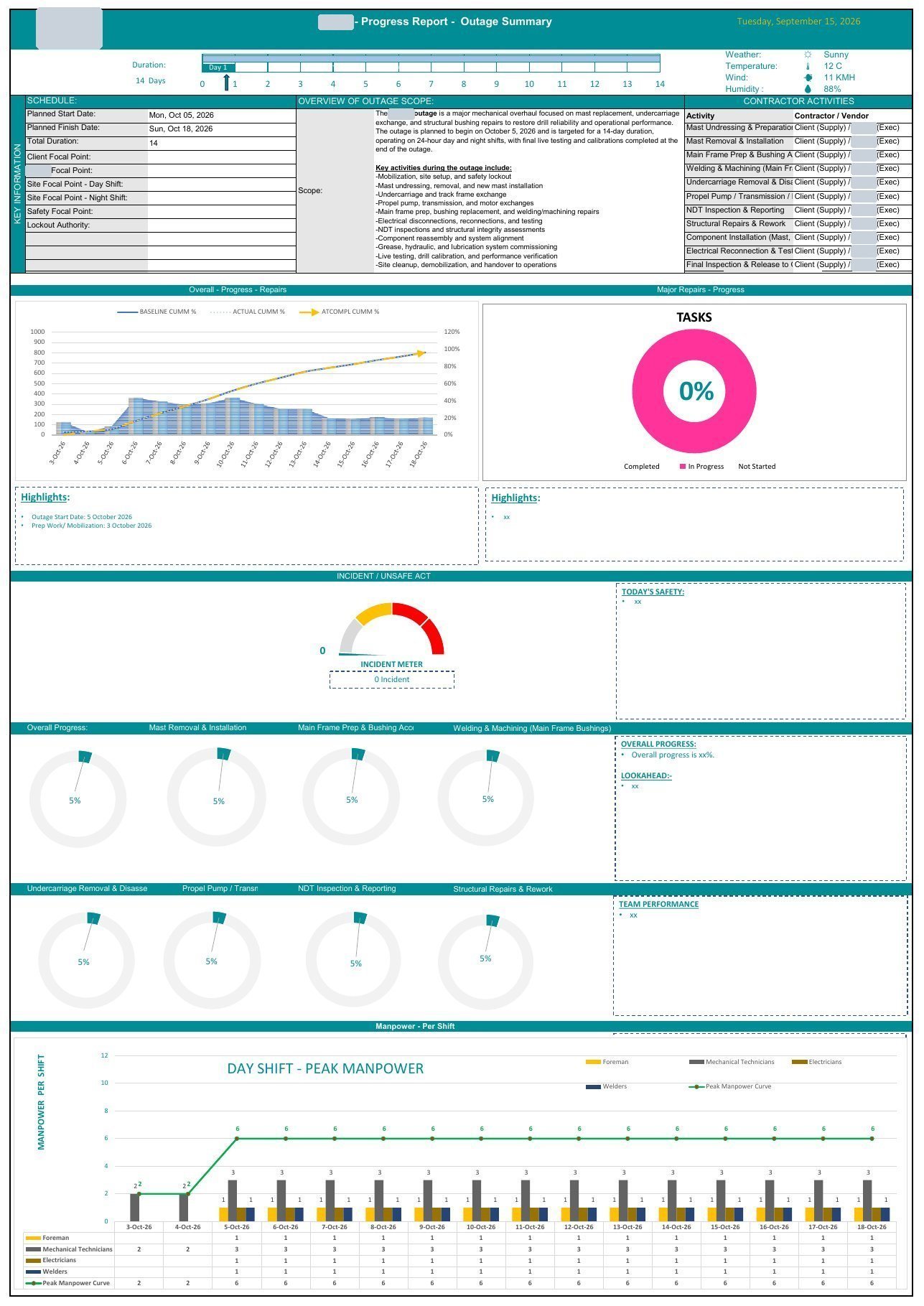
    Day-shift and night-shift manpower plansPer-trade crew per day with the peak-manpower curve — the charts shown on the right.
  • 4
    Daily progress reports — day & night (PDF + Excel)Planned vs actual per shift, issues, next-shift plan. Rev-controlled templates ready to fill in.
  • 5
    Outage narrative / basis of schedule (Word)Scope, sequence, assumptions, crew strategy and risks in plain language for the client's approval.
Client names, logos, site names and people's names are blurred or removed in every sample we show.
Night-shift crew working on a heavy mining shovel under floodlights Outages run around the clock — our packages plan both shifts, not just the day.
Outage schedule — structure3 Oct → 18 Oct 2026 · day & night shifts

Activity names are generalised for confidentiality; dates and shift pattern are from the delivered package.

Day shift peak manpower chart: 2 mechanical technicians on 3–4 October, then a foreman, 3 mechanical technicians, 1 electrician and 1 welder (6 per shift) from 5 to 18 October
Day shift — peak manpower chart from the delivered package (peak 6 per shift).
Night shift peak manpower chart: no crew on 3–4 October, then 3 mechanical technicians, 1 electrician and 1 welder (5 per shift) from 5 to 18 October
Night shift — peak manpower chart from the delivered package (peak 5 per shift).
Field proof — maintenance & shutdown work we planned

We don't just draw the Gantt. We have stood on the belt it schedules.

Belt and drive replacements, trimmer and spout changes, bearing work on a rail-car dumper, multi-day shutdowns at a bulk-handling terminal — planned, scheduled and reported by our founder. Audio removed and company identifiers blurred; the work is real.

Belt changeConveyor belt change — crane picks and crew on the gallery · 20s
SiteTerminal overview — conveyors, berths and stockpiles · 18s
Ship-loaderShip-loader belt replacement · 16s
StackerStacker belt replacement over the stockpile · 18s
BerthShip-loader trimmer replacement at the berth · 18s
DriveConveyor drive replacement by crane · 18s
RailRail track works in the dumper yard · 18s
Night shiftNight shift on the belt change · 18s
Conveyor gallery and transfer tower during a daylight shutdownMobile crane lifting a conveyor truss sectionStacker boom over the stockpile during belt replacementNight work at the berth under tower lightsCrane set-up for bearing replacement seen from the galleryYard access and conveyor line prepared for the shutdown
The Excel manpower tool — live

Man-hours, peaks and valleys, time-phased — from any schedule.

Our Excel tool turns a P6 or MS Project export into a manpower dashboard: crew per trade per day or shift, the peak-manpower curve, cumulative man-hours and the valleys you can smooth before the client sees them. This is the real crew plan from the outage package above, running in your browser.

Two planners reviewing a manpower histogram in a site office at sunset Peaks and valleys reviewed before the histogram goes to the client.
Manpower dashboard — outage crew plan3–18 Oct 2026 · per-trade crew per shift · hours per shift adjustable
Peak crew—
Total man-hours—
Man-shifts—
Avg crew / day—
Valley (lowest)—
Peak period—

Crew per day by trade + peak-manpower curve

ForemanMechanical techniciansElectriciansWeldersPeak curve

Cumulative man-hours S-curve

Cumulative man-hoursMan-hours per day

Time-phased from the schedule

Resource assignments spread across activity durations by calendar, so the histogram moves when the schedule moves.

Peaks & valleys

See the spikes before the client does, level them with float, and show a crew curve a contractor can actually staff.

Man-hour dashboard

Per-trade, per-shift, per-week totals; planned vs actual man-hours; productivity factors; one-page dashboard for the Monday meeting.

Client-ready output

Charts styled for the proposal or the monthly report, exported to PDF, PowerPoint or Power BI.

AI planning, scheduling & analysis

An AI scheduling assistant that works on your live Primavera P6 data.

Ask it in plain English: what's slipping, where the critical path runs, what the 4-week look-ahead is, or to draft a new schedule from a scope. It builds the Excel S-curve report and the PDF report pack automatically — with the project-controls rules we use on real projects baked in.

Access is by team code so your project data stays with your team. Community Pro members and training students get access included.

Watch the walkthroughThe video is being prepared — open the live assistant or ask us for a demo.

Walkthrough: schedule health, what's slipping, look-ahead, S-curve and PDF pack — on a live P6 project.

Project dashboardStatus, milestones, float and progress in one view.
Schedule healthLogic gaps, open ends, constraints, float distribution.
Critical path & what's slippingThe driving chain and the activities eating float.
4-week look-aheadWhat starts, what finishes, what needs a decision.
Excel S-curve report — auto-createdPlanned, earned and actual curves straight from P6.
PDF report packClient-ready weekly or monthly pack in one click.
Draft a scheduleFrom a scope description to WBS, activities and logic.
Impact & what-if analysisTest a delay or a crew change and see the finish move.
Resource loading & templatesLoad crews, apply rules of credit, reuse a project as a template.
Rules of credit built inWeighted steps per deliverable — e.g. PO 5%, drawings 10%, material 20%, fabrication 20% — so progress is earned, not guessed.
Earned-value settingsFixed Duration & Units with Physical % Complete; reports Performance % Complete, never Schedule %.
Baseline ritualBuild → link → PO ETA → freeze. B1 for the contract baseline, B2 for the re-baseline — never overwritten.
Schedule levelsL2 for proposals, L3 for the execution baseline, L5 for progress and shift-level outage work.

Earned-value quick calculator — SPI, CPI, EAC

Type your numbers (any currency or hours). Green is on or ahead of plan; amber is within 10%; red needs a recovery plan.

SPI = EV / PV—
CPI = EV / AC—
SV = EV − PV—
CV = EV − AC—
EAC = BAC / CPI—
ETC = EAC − AC—
VAC = BAC − EAC—
TCPI to BAC—
A project planner standing at a desk in front of schedule and earned-value dashboards Planners who can run P6, build the dashboard and explain the variance.
Manpower sourcing, hiring & supply

Need planners, schedulers or project managers? We supply them — USA, Canada & worldwide.

We source, screen and place project-controls people — on contract, contract-to-hire or direct hire — or run your scheduling as a remote desk. Every candidate is tested on real P6 / MS Project work before you meet them.

PlannersSchedulers (P6 / MSP)Project plannersProject controls engineersCost controllersProject coordinatorsProject managersOutage & turnaround plannersDocument controllersEstimators
Contract

Project-based

A planner or scheduler for the proposal, the baseline or the outage — weeks or months, remote or on site.

Contract-to-hire · direct hire

Permanent placements

Screened and skills-tested candidates for your project-controls team, with a replacement period you can rely on.

Remote desk

Scheduling as a service

We run the updates, reports and look-aheads every week — your team gets the outputs without the headcount.

Training & courses

Become a job-ready planner in 90 days — then a certified one.

Hands-on training on the tools the job actually uses — Primavera P6, MS Project, Excel, Power BI, SQL and AI automation — plus a customised plan, CV optimisation and job-search support until you land the role.

Most popular

Job-Ready Project Controls Program

$999 USD · one-time
90-day path from zero (or stuck) to employed planner / scheduler.
90-day job guarantee. Complete the program and the customised plan; if you haven't landed a job within 90 days of finishing, we refund your fee in full. Terms
  • Primavera P6 & MS Project — build, baseline, update, report
  • Excel manpower & S-curve tools (the ones on this page)
  • Power BI dashboards & SQL for project data
  • AI automation for planners + AI Scheduling Assistant access
  • Customised training plan, CV optimisation, interview prep
  • Job-search support & community job postings
Enroll — $999

Secure checkout by Stripe. Questions first? Ask on WhatsApp.

Primavera P6 Essentials

$199 USD · one-time
P6 from zero, taught the way projects use it.
  • EPS, WBS, activities, relationships & calendars
  • Resources, costs & baselines
  • Progress updating, layouts, filters & reports
  • Practice project with files included

Training only — no job guarantee on this course.

Enroll — $199

Free: S-curve tutorial

$0 watch now
Build an S-curve and one-page dashboard from a P6 resource export in Excel — six steps.
Tutorial videoBeing uploaded — ask us for the link meanwhile.Get the link
  • Export resource data from P6
  • Planned vs actual curves & the one-page dashboard
Get the template in the free community
New · maintenance

Maintenance & Operations Planner Course

$199 · 8 live modules + recordings

Job plans, backlog, weekly scheduling to capacity, kitting, outage days and planner KPIs — built from real shutdown work.

New · turnarounds

Outage · Turnaround · Shutdown Planning

$199 · 8 live modules + recordings

Scope freeze, work packages, T-minus milestones, the P6 shutdown schedule, day / night manpower, daily reports and S-curves — on a real 16-day outage.

Exam prep · taught by a holder

PMP · PMI-SP · PMI-RMP · CMRP · CRE · P.Eng

$199 · per credential

Small-group exam coaching with a study plan, practice questions, application help and exam-day strategy — by someone who holds the credential.

Primavera P6MS ProjectExcel manpower & S-curvesPower BISQL for project dataAI automation for plannersEarned value (EVM)Maintenance planningOutage & turnaround planningPMP · PMI-SP · RMP · CMRP · CRE · P.Eng prep
Weeks 1–3

Foundations

Project controls basics, WBS, logic, critical path, EVM — and your customised plan based on where you start.

Weeks 4–6

Tools

P6 and MS Project end-to-end, Excel manpower & S-curve tools, Power BI and SQL on real-shaped data.

Weeks 7–9

Portfolio project

Build a complete schedule package — baseline, histogram, S-curve, report pack — you can show in interviews.

Weeks 10–12

Land the job

CV optimisation, LinkedIn, interview drills, applications with our support and community job postings.

Typical path — the plan is customised to your experience and target role.

Cover of the book Make It Happen! How to Run Any Project Like a Pro
Free book · written by our founder

Make It Happen! — How to Run Any Project Like a Pro

The plain-English project management book, free as a PDF. Written for teens and first-time project managers, it is the same thinking we use on multi-million-dollar schedules — stripped of the jargon: what makes something a project, who does what, the five stages, the one-page promise, scope and how to say no, breaking work down, the calendar chain with zero wiggle room, money, quality, risk, keeping everyone in the loop, and finishing. Ends with a four-tool project toolkit you can use tomorrow.

  • Give it to a student, an apprentice, a new coordinator — or your own kids
  • Great first read before the P6 Essentials or Job-Ready program
  • 40-page PDF, read on any phone; no credit card

We email you the link and occasional planning tips. Unsubscribe any time by replying "stop".

Corporate & on-site training — USA · Canada · worldwide

Train your whole project team — at your office, on your project, or live online.

Primavera P6, MS Project, earned value, manpower planning, Power BI reporting and AI-assisted scheduling, taught on your own projects and templates by a working project-controls trainer. Half-day workshops to multi-week programs.

  • Curriculum customised to your schedules, your reporting and your client's requirements
  • On-site anywhere in the USA and Canada — and worldwide by arrangement — or virtual; your team keeps the templates
  • Follow-up support after the workshop so the new habits stick

Sales team: +1 (347) 610-2525 · bestwegive2@gmail.com

A trainer presenting a Gantt chart and S-curve to a project team in a boardroom Workshops run on your real schedules, not textbook examples.
Community

Join the project-controls community on WhatsApp.

Daily planning and scheduling content, job postings, questions answered, and early access to our tools — free to join. Go Pro for the AI Scheduling Assistant and the templates.

Free
WhatsApp community
  • Daily content: P6, MS Project, EVM, Excel, Power BI tips
  • Job postings for planners, schedulers and project controls roles
  • Ask questions, get answers from working planners
Join free on WhatsApp
Community Pro
Tools, templates & AI access
  • Access to the AI Scheduling Assistant
  • Excel manpower & S-curve templates and new tools as we release them
  • Priority answers and resources from the team
Go Pro — secure checkout

Price shown at checkout. Cancel any time by messaging us.

Proof & reviews

Proof of work, not promises.

Everything on this page is something you can open and check — a real delivered package, a live tool, a free tutorial. Reviews are collected from real clients and students only.

Delivered work

A real outage package

The 16-day, two-shift outage package above is a real deliverable — redacted, not invented. See the structure.

Live tool

An AI assistant you can open

The scheduling assistant runs on live P6 data today. Open it and ask for a team access code.

Free teaching

Watch us build an S-curve

Our free six-step tutorial shows exactly how we build S-curves and dashboards in Excel. Watch it.

Credentials, not claims

Our founder holds P.Eng, PMP, PMI-SP, PMI-RMP, CMRP and MMP — all current.

P.Eng certificate held by our founder, name and ID number hidden
P.EngProfessional Engineer · PEGNL (Canada)
PMP certificate held by our founder, name and ID number hidden
PMPProject Management Professional · PMI
PMI-SP certificate held by our founder, name and ID number hidden
PMI-SPScheduling Professional · PMI
PMI-RMP certificate held by our founder, name and ID number hidden
PMI-RMPRisk Management Professional · PMI
CMRP certificate held by our founder, name and ID number hidden
CMRPCertified Maintenance & Reliability Professional · SMRP
MMP certificate held by our founder, name and ID number hidden
MMPMaintenance Management Professional · PEMAC

Name and ID numbers hidden on purpose; originals shown on the call and verifiable on each registry. These are the credentials behind our exam prep courses.

Worked with us or trained with us?

Your review goes here — with your name and company, in your words. Google reviews are being set up; until then, send it on WhatsApp and we'll post it with your permission.

FAQ

Questions we get every week.

What schedule levels do you build?
Level 2 for proposals and bids, Level 3 execution baselines for EPC and fabrication work, and Level 5 progress and shift-level schedules for outages and turnarounds — in Primavera P6 or MS Project, with Excel and Power BI reporting on top.
How does the 90-day job guarantee work?
Finish the Job-Ready Program, complete the customised training plan and the CV optimisation, and apply to roles with our support. If you have not landed a job 90 days after completing the program, we refund your fee in full. The P6 Essentials course is training only and does not include a guarantee.
How fast can you turn around a proposal schedule?
Tell us the bid deadline on WhatsApp and we will confirm the same day whether we can hit it and what we need from you. Proposal schedules are built against the bid date, not a generic lead time.
Where do you work?
We are based in Jacksonville, Florida. Schedules, reporting and staffing are delivered remotely to clients across the USA, Canada and worldwide. Corporate training and P6 implementation can be on-site at your office or project, or virtual.
How does the AI Scheduling Assistant access my data?
The assistant works on live Primavera P6 data through a secured team access code, so your projects are visible only to your team. Ask our sales team on WhatsApp for a code and a walkthrough.
Can you supply planners and schedulers for my project?
Yes. We supply planners, schedulers, project planners, project controls engineers, cost controllers, coordinators and project managers on contract, contract-to-hire or direct-hire terms, or as a remote scheduling desk.
Will I see the client names in your samples?
No. We remove or blur client names, logos, site names and people's names from every sample we share — the same confidentiality we will apply to your project.
What actually happens on the free 30-minute Schedule Rescue Session?
You send us your bid, schedule file (P6 .xer, MS Project or Excel) or outage scope before the call. On the call a planner walks through it with you: where the float is hiding, what is really driving the finish date, what a client reviewer will push back on. Afterwards you get a written 3-point action plan. If we can help further, we quote; if not, you keep the plan. No pitch, no pressure.
Will you sign an NDA, and how is my data handled?
Yes — send yours or ask for ours before you share anything. Your files are used only for your project, and nothing from your project is ever shown publicly without written permission and full redaction (see the sample package above for the standard we apply).
How do you charge?
Fixed quotes for defined deliverables (a proposal schedule, a baseline, an outage package, a dashboard) and simple monthly retainers for ongoing P6 management and reporting. You see the price before any work starts, and the free session is exactly that — free.
We already have a planner / a schedule. Is this still useful?
Usually that is when it is most useful: a second pair of eyes before the bid goes out, before the baseline is frozen, or when the monthly report has stopped matching what the site is saying. We work alongside in-house planners constantly, and most of our P6 management clients have one.
Contact

Tell us about the schedule, the role or the training you need.

We reply on WhatsApp within business hours (Eastern). Attachments welcome — RFPs, drawings, old schedules, job descriptions.

Send a brief

Goes straight to our sales team's inbox.

Or send it on WhatsApp

By sending you agree to be contacted about your request. No spam, no lists.

P.S. If you only read this far: we build and baseline schedules in Primavera P6 and MS Project that win bids and survive the first progress update, we supply the planners when you don't have them, and we train the ones you do. The first step is free — a 30-minute Schedule Rescue Session with a written action plan you keep either way.

Every week a bid goes out with a schedule nobody can defend, and every month a progress report says 60% while the site says 45%. Both end in the same place: a hard conversation with the client that could have been avoided in one call. Book the call.

Call WhatsApp Free session